In this video, I’m sharing why I don’t offer a free trial for my app, Sofa.
When I first launched the Super Sofa subscription, I struggled with decisions around pricing and whether or not to offer a free trial. Most advice said, “You should offer a free trial because that’s what everyone does.” But that never sat right with me.
Now, after a few years of running a subscription app without a free trial, I’ve gained clarity on why I don’t do it — and why Sofa’s freemium model works better without one.
I’m not against free trials! They can work great for certain products. But for Sofa, it doesn’t make sense. In this video, I’ll walk through my thought process and explain why.
Sofa (Coming soon)
In this video, I share my experience using the Leica Q2 over the past few months and try to decide whether I should keep it or sell it. The Leica Q2 is an incredible camera with a lens that produces stunning images, but it’s not without its quirks. I’ve used it for travel, family events, everyday carry, and more—so I’ve developed some strong opinions about its pros and cons. If you’re considering the Q2 or are curious about what makes this camera special (and frustrating), this video is for you.
In this video, I dive into the realities of building an app: why starting is the easy (and fun) part, and why the real challenge lies in growing and maintaining it over time.
I’ll talk about the excitement of launching a new project, the hurdles you’ll face when life gets busy or progress feels slow, and how setting the right expectations can make all the difference. I’ll share tips on building sustainable systems, celebrating small wins, and staying motivated when you hit technical, emotional, or mental roadblocks.
Whether you’re creating your first app or struggling to keep going, this video is here to remind you to enjoy the process and keep moving forward.
Sofa (Coming soon)
In this video, I share the lessons I’ve learned after investing $30,000 into marketing my app over the past three years. For an indie app developer, it’s a significant amount, and I dive into why I chose to spend it, where it went, and what came out of it.
I discuss the challenges of getting attention in today’s competitive market and why I decided to focus on sponsoring podcasts and YouTube channels in the Apple and tech world. I also explain my goals for this marketing effort—building brand awareness rather than immediate conversions—and the results I’ve seen, including increased sales, recognition from Apple, and turning this into my full-time job.
Sofa (Coming soon)
In this video, I answer a great question I got on YouTube: How did you approach marketing in the beginning of making an app?
I’ll share what I did when starting out, how my approach evolved over time, and what I’d do differently if I could go back. Whether you’re just starting your indie app journey or looking to improve your marketing strategy, I hope this video gives you some helpful insights!
Sofa (Coming soon)
When starting out as an indie app developer, should you make one app or multiple apps? While there are many way to answer that question, I think focusing on one app is a better approach when starting out.
Sofa (Coming soon)
In this year-in-review video, I reflect on 2024, sharing updates on my indie projects: Sofa, digital products, and YouTube. I discuss milestones, growth stats, and future plans, all in an unedited, unscripted format. Watch to learn about what went well, where I struggled, and what’s next for the coming year!
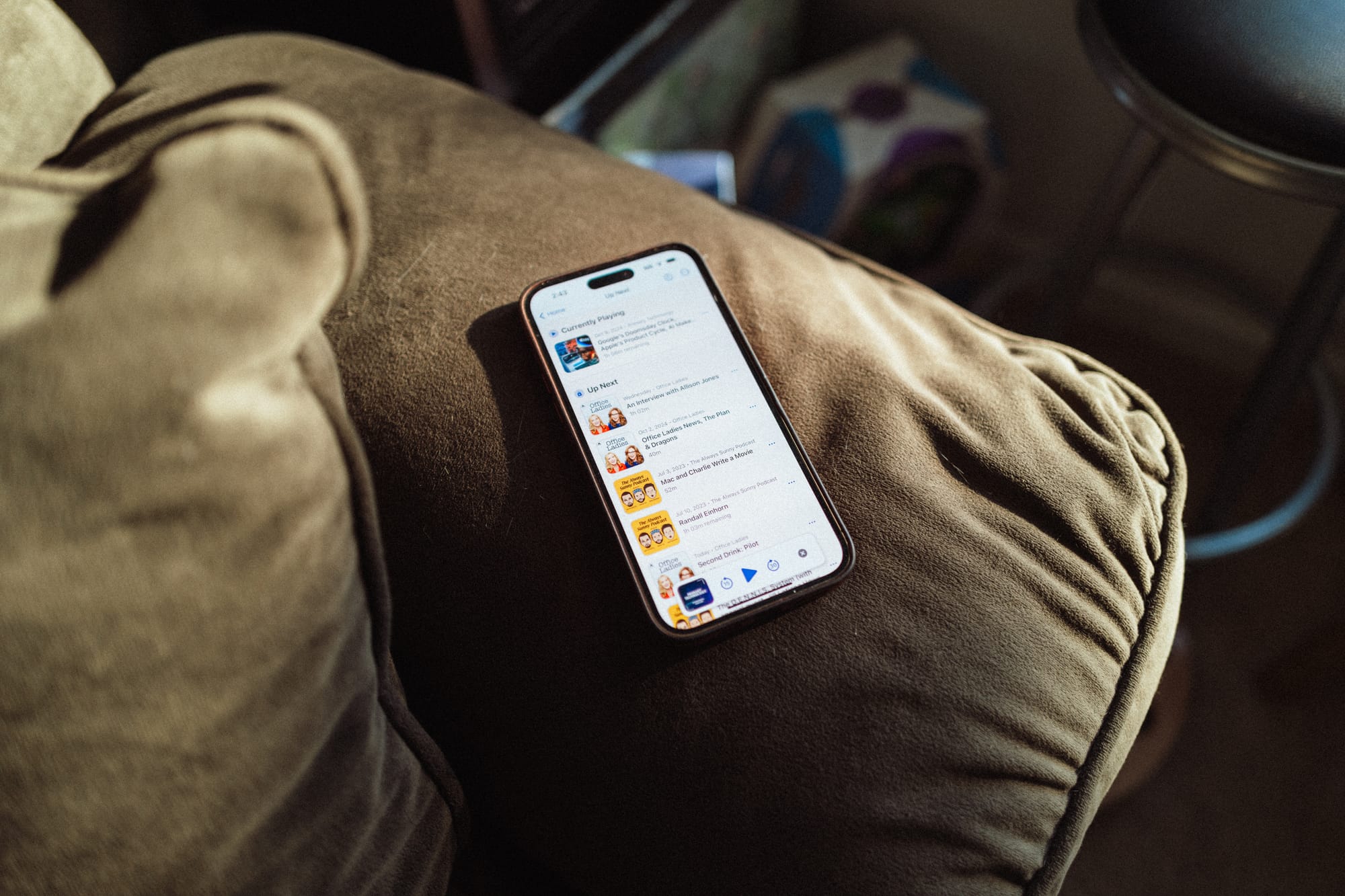
During the summer and fall, I’ve been hard at work on a big new feature for Sofa…the ability to listen to Podcasts in the app.
I’ve been exclusively using Sofa as my primary podcast player for the past month, and I gotta say, it’s pretty awesome 😜. I don’t have a launch date yet, but will be doing a public beta in the next few weeks.
It’s been about one year since I quit my job and went full-time as a solo indie app developer with Sofa.
I wanted to reflect and share how my first year has gone. The good, bad, what I've learned, and answer your questions. This is a loooong video 🫣.
Thanks to everyone who shared their questions!
I’m happy to announce that Sofa is now available on the Mac and Vision Pro!
Up to this point, you've technically be able use Sofa's iPad app on the Mac and Vision Pro, but this new version of Sofa is built specifically for the Mac and Vision Pro. There is still a lot more work to be done for this apps, especially the Mac, but this is a good improvement over the existing iPad versions.
There were a bunch of design challenges bringing Sofa to Vision Pro, specifically around themes. If you don’t know, Sofa has over 100 themes to choose from, and they’ve been a fun part of the overall experience.
The additional challenge was that I don’t personally have a Vision Pro, so testing was very limited. Luckily, I have some very nice friends who tested and shared helpful feedback.
In the end, I’m pretty happy with where the design landed, but I’m expecting to iterate as I get more feedback from people using it.
You can read the full release notes here, and download the update from the App Store.
Apple's WWDC is coming soon, and I’ve spent some time thinking about what I'd like to see as a user of Apple's products and as a developer for Apple's products.
I think there are some fun ones in here.
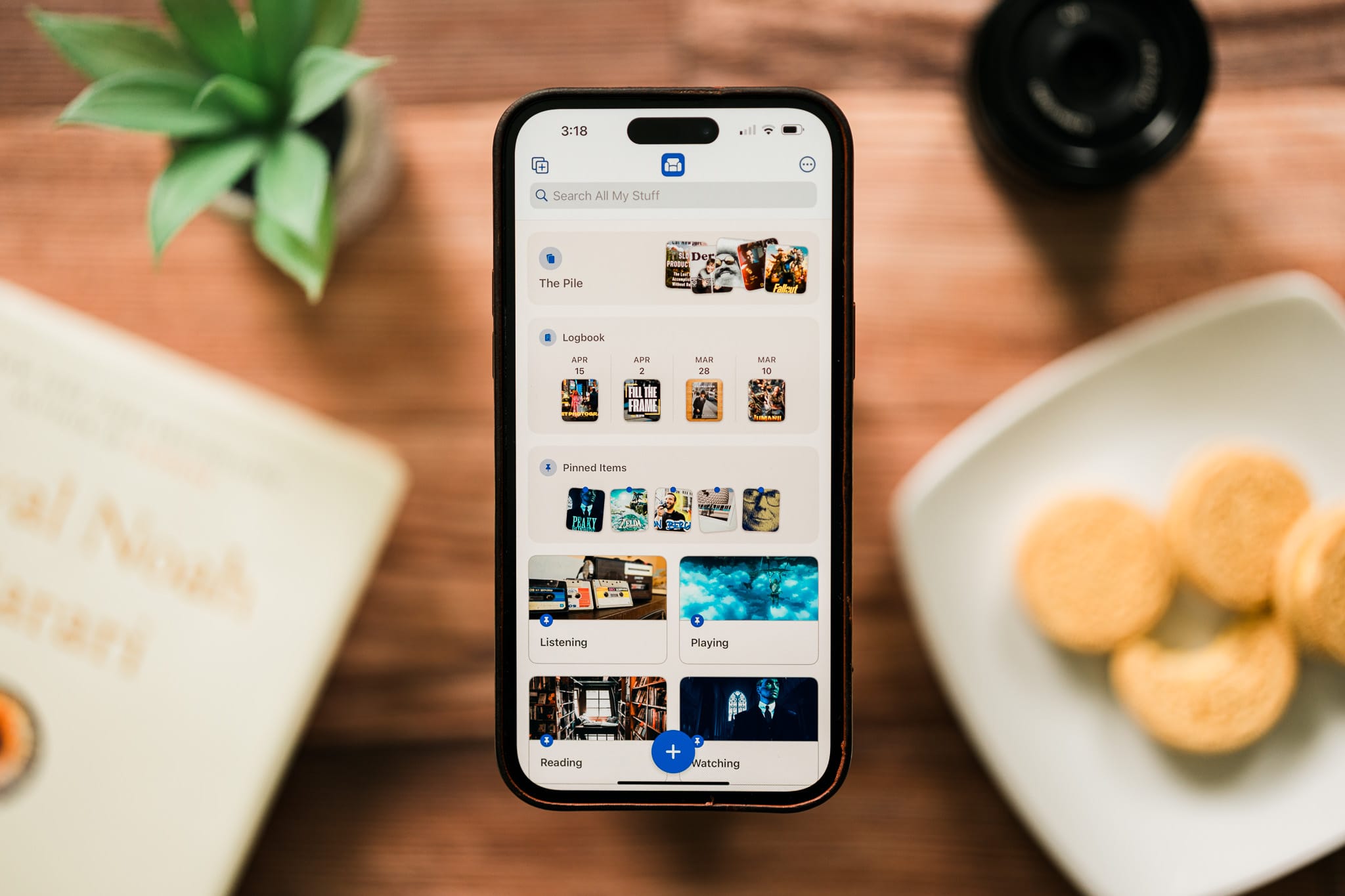
For Sofa 4.0, I redesigned the Home Screen to include rich, widget-style cards for the primary lists: The Pile, Logbook, and Pinned Items.
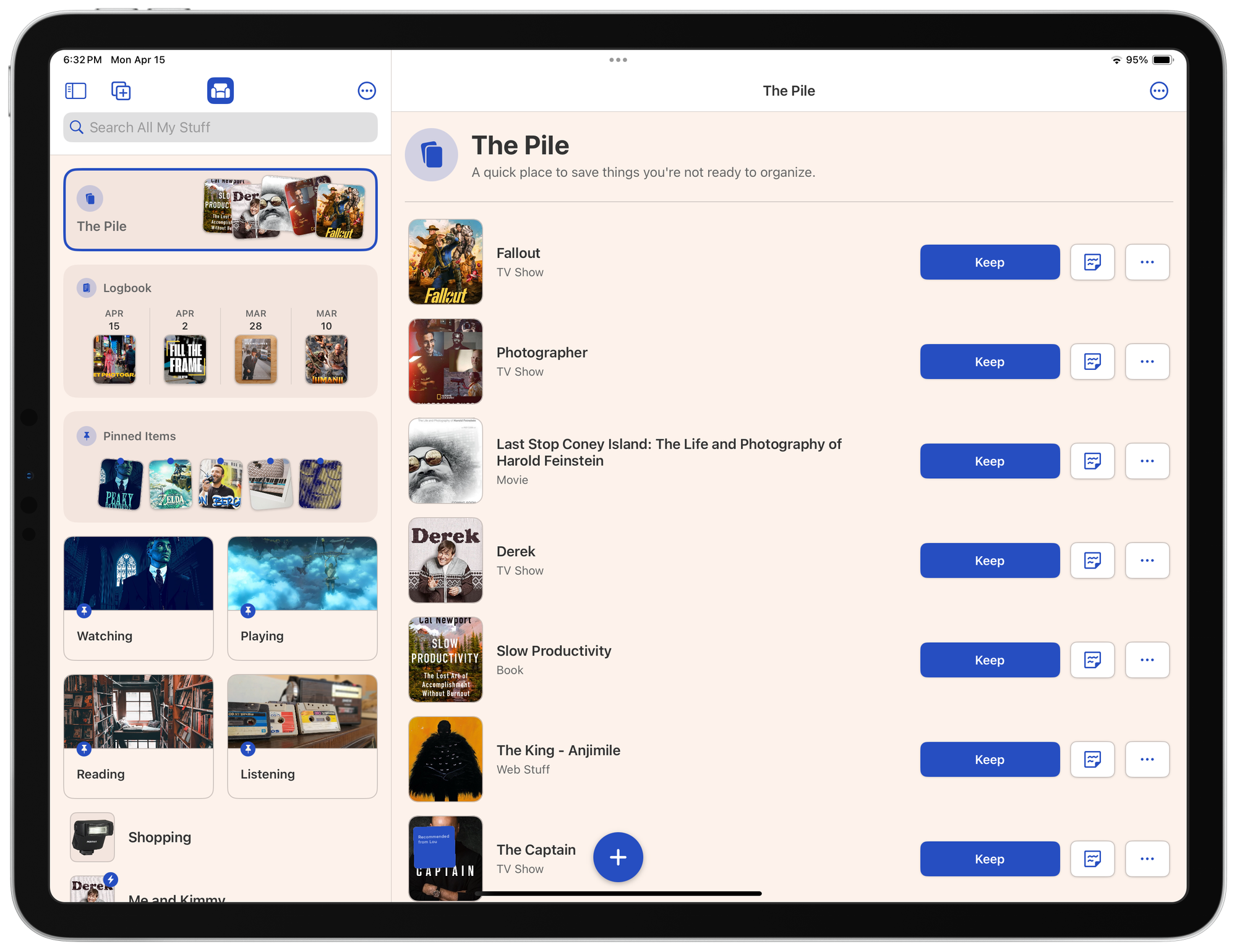
I liked that this gave people handy, scannable information about what's inside each list, but also brought a quirky style to the app.
Since the release, I've been running into some layout issues across devices which gave me a chance to iterate on the design a bit. I personally love the way The Pile card is designed. You have the title on the left, and the contents on the right. I wanted to see if I could bring that same structure to Logbook and Pinned Items. It turns out I can!
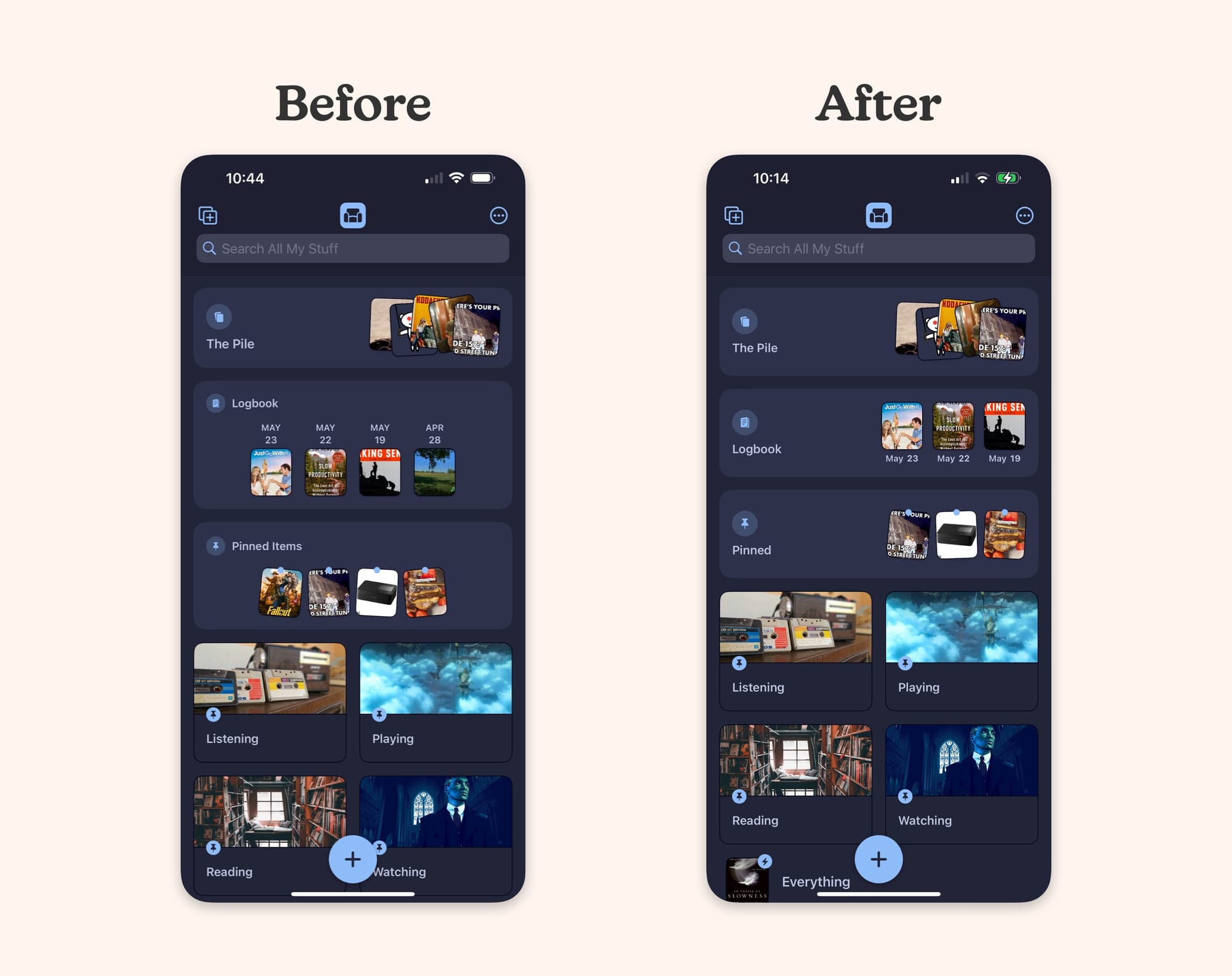
This new design brings a few benefits:
The content is easy to scan
There are still strong, visual differences between each card
It takes up less vertical space to allow seeing more lists below
It gives me a good template to design future cards (of which I have ideas)
It still retains the quirky personality that I'm trying to bring to the app
While you do technically get less information than the previous design, I think you get enough information.
This design change is live as of Sofa 4.0.5.
As a professional nerd, I have many computers. All of which serve different roles in my life.
The iPhone is my personal computer
The Mac is my work computer
The Apple Watch is my health computer
The Apple TV is my entertainment computer
Until recently, I didn’t have a clear place for the iPad. I used it a lot, but I could never really explain why I would choose it over my iPhone or Mac.
Now, I think I’m at a place where I have a good idea of where the iPad fits into my life. The iPad is my “hobby” computer.
The opinions I’m sharing here are about me, and only me. I know of many people who use an iPad as their primary computer, and I’m not suggesting it can’t be done. Many people do it.
I’m simply sharing my personal experience with the iPad.
Like many people, there was a period where I had dreams of the iPad filling larger roles in my computing life. I saw it as an “everything” computer that could very likely replace my Mac.
Especially once Apple released the Magic Keyboard with a trackpad for the iPad Pros.
There was also a stretch of time where Apple was really pushing the iPad as a laptop/Mac replacement. This was before the Apple Silicon Macs. I fully bought into this idea and dove into the iPad Pro determined to make it work.
The thought of this was awesome. A single thin, light computer that could act as a laptop or tablet as needed.
Unfortunately, I learned I couldn’t replace my Mac with an iPad.
The main reason the iPad couldn’t work as a Mac replacement for me is that I make an iOS app for a living, and I literally can’t use an iPad for that.
The main app I use to build Sofa is Xcode, and it only exists on the Mac.
I kept hoping Xcode would come to iPadOS in the same way Final Cut Pro and Logic Pro have, but I don’t know if it will ever happen.
Even if it does come to iPadOS at some point, will it be the full version or a stripped down version that won’t work for everything I need?
I personally prefer to use the iPad with a single app at a time. I know you can use split view and stage manager to work with multiple apps at once, but those have never clicked with me.
If I’m doing stuff that requires jumping between multiple apps, the iPad (and the iPhone) just feel tedious.
This could be as simple as referencing an email while writing a note in Apple Notes. The back and forth between apps on the iPad feels harder for me than on the Mac.
I’ve been using macOS for close to 20 years and I just love it. I had a Mac well before an iPhone and iPad, and I’m extremely comfortable and efficient using it.
Using the Mac puts me into “work-mode”, which I like. It’s easy to jump between multiple apps, manage windows, organize files, and all the other computery stuff.
If I was forced to use only one computer, it would be a Mac. Even over the iPhone.
Now that I have a clearer idea of where the iPad fits into my life, I want to share how I’m using it.
For me, casual computing is anything that isn’t related to work. So, when I’m done working and sit on the couch to relax, the iPad comes out.
This is things like:
Browsing the web
Triaging emails
Writing and referencing notes
I can, and do, all of these things on my Mac and iPhone, but the iPad gives a nice experience.
Entertainment is the easy and obvious use for myself, and probably everyone who has an iPad. The iPad is literally the best TV I’ve ever owned. I can bring it everywhere and watch anything on it.
This is things like:
Youtube
Watching movies and shows
Outside of work, photography is probably my biggest hobby and the iPad is so great for editing photos. This is one of the few creative tasks I do that I find the iPad to be superior to the Mac.
I use Lightroom, and do edit photos on my iPhone and Mac, but I find the iPad to be the most pleasant for this. The iPad gives me a big screen that I can get very close to, and edit with my fingers.
Photo editing alone is enough for me to justify having an iPad.
It took me a few years to experiment and learn that the iPad is my “hobby” computer. With this clarity, I’ve come to enjoy using my iPad a lot more. I’m rarely frustrated by its lack of Mac-like functionality, because I’ve adjusted my expectations.
It's the best hobby computer I’ve ever had.

That time I took a picture of the Skyliner from the bus stop at Hollywood Studios.
 I started working on Sofa 4.0 323 days ago 🙃. It feels good to finally ship all this fun stuff out!
With 4.0, you can add basically anything, and expand Sofa to fit your exact needs with Custom Categories, Ingredients, and Smart Lists. I have a page on the Sofa website with all the details.
To celebrate the launch, I'm running a 40% off sale for the Super Sofa annual plan. The sale ends Saturday, May 5, 2024. Use this link from your iOS device to redeem the sale.
There have been a few really great reviews of Sofa 4.0 that you might be interested in checking out.
John Voorhees over at MacStories showed how he's using Sofa to keep track of places and restaurants in his local area.
Sofa 4.0: A Customizable Downtime Tracker Without Compromises
Stephen Robles did an awesome deep-dive video showing all the new stuff in Sofa 4.0 and how he's using it to track what to watch with his family.
9to5Mac had a nice little review too.
I needed a little mental break from Sofa work, so I made a video about my experience of renting a Leica Q2 for a week. Overall, the camera isn’t for me, but I’m glad I had time with it. It clarified what I value in the cameras I use.
Sofa 4.0 is coming along very nicely and I'll be sharing updates soon!
Imagine you're hosting a party with friends. Chances are, you're going to want your guests to be as happy and comfortable as possible. Being an accommodating host includes providing food and drinks that your guests will like, cleaning your bathrooms, and playing good music.
You wouldn't only offer a single type of drink to your guests just because it'sem>
Building software is a similar experience. Yes, I'm building the app forem>
This analogy has helped me figure out when I offer a setting vs making an opinionated design choice. It's going to be hard (impossible) to get this right all the time, and I can't make settings for everything, but my efforts are to be more accommodating to my guests (Sofa users) based on what they need.
By default, Sofa comes with three primary, or system-level, lists:
Each of these lists have their own intended purpose, design, and functionality, but the one thing they have in common is that you can't remove or hide them.
I've learned that there are people who use all, some, or none of these lists. For the people who use some or none of them, having them always be visible is a little (or very) annoying.
How can I accommodate these people?
I explored a bunch of ideas, but in the end I've settled on two specific accommodations:
Instrong>
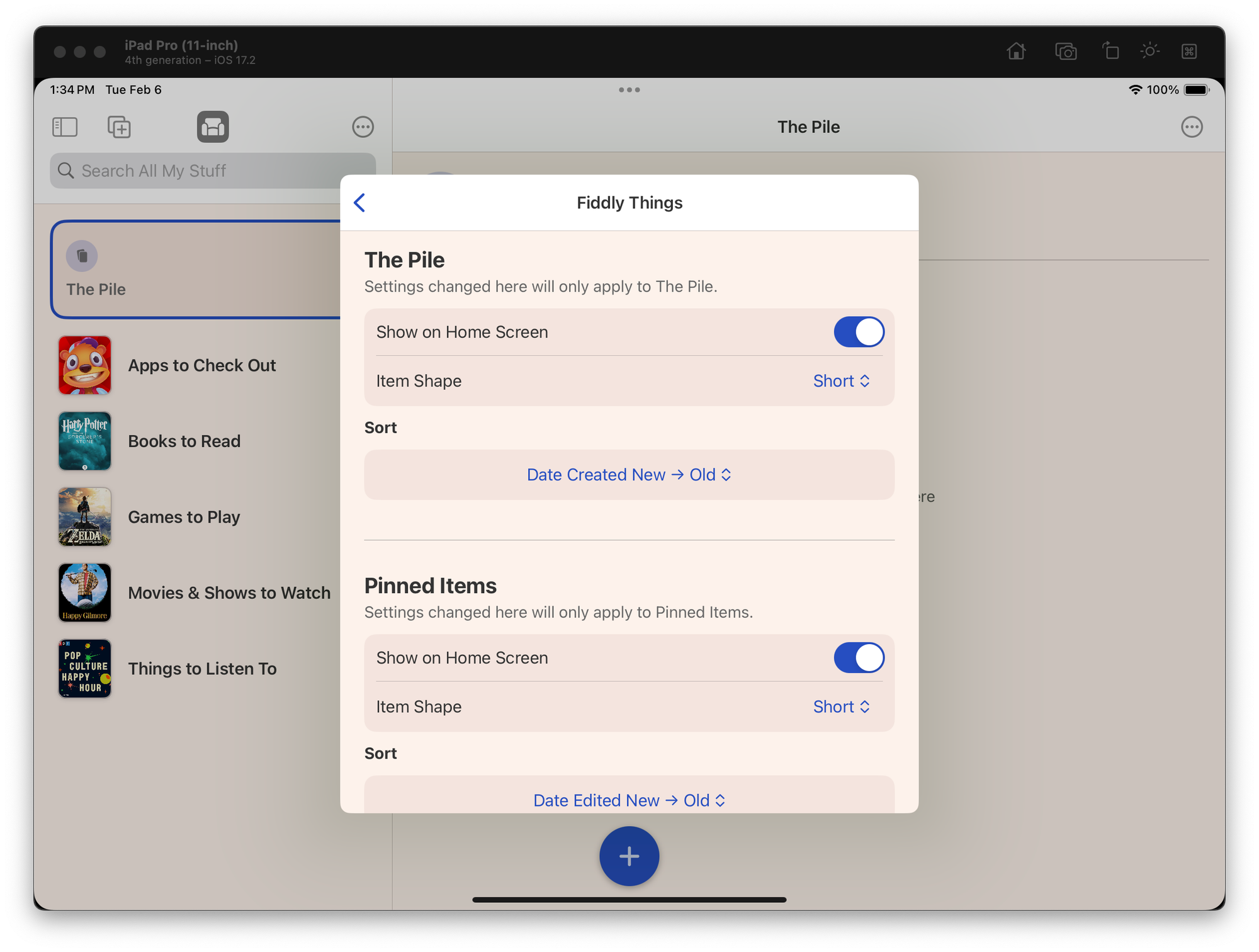
As part of the Sofa 4.0 redesign, I've added new, rich cards for each of the primary lists on the home screen.
These rich cards are designed to be highly fun and functional. Being able to see a preview of the items you've added to the Logbook, or have pinned is genuinely helpful. Inline with Sofa's playful personality, I've designed each card to be a more physical representation of the list.
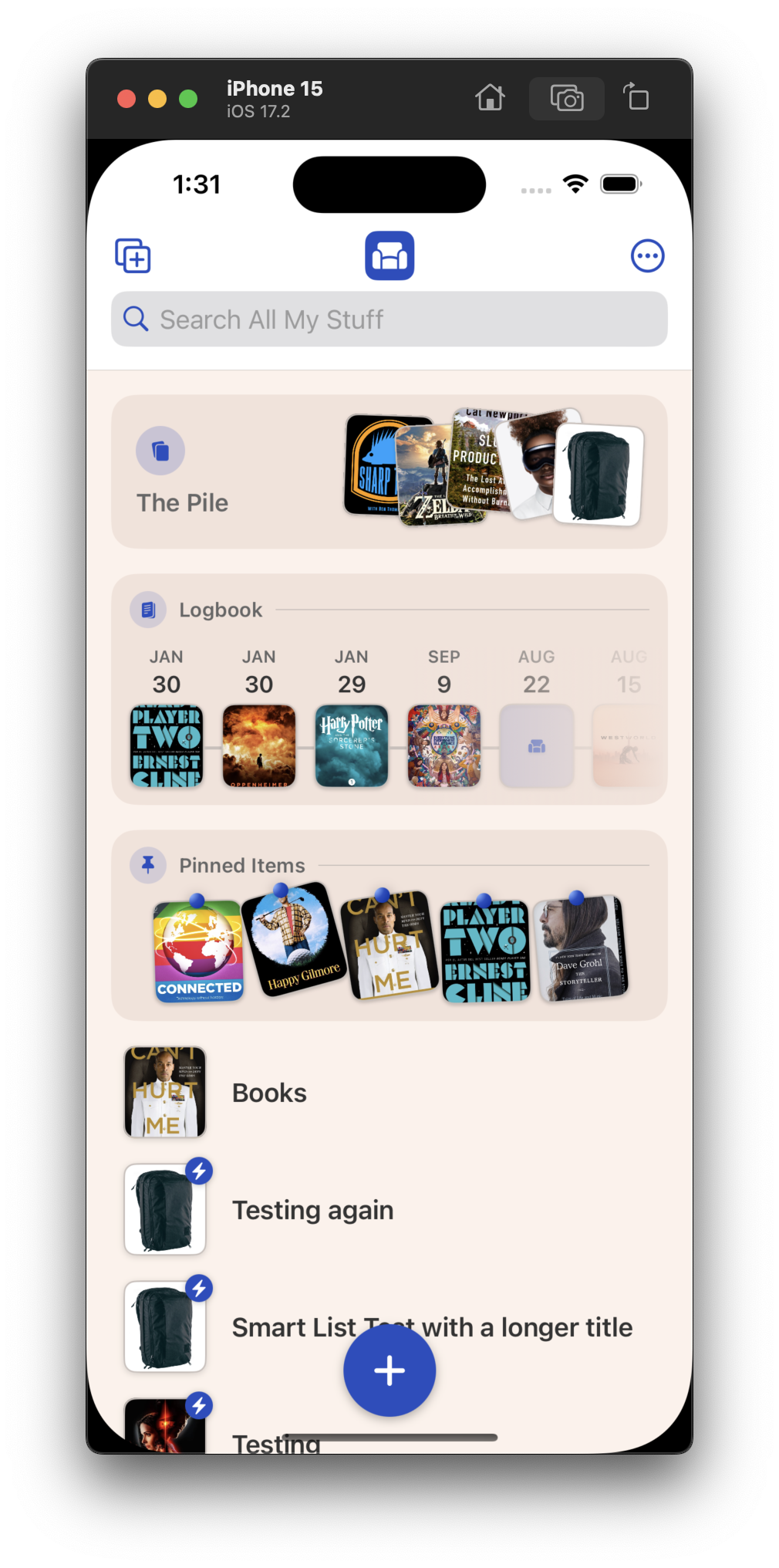
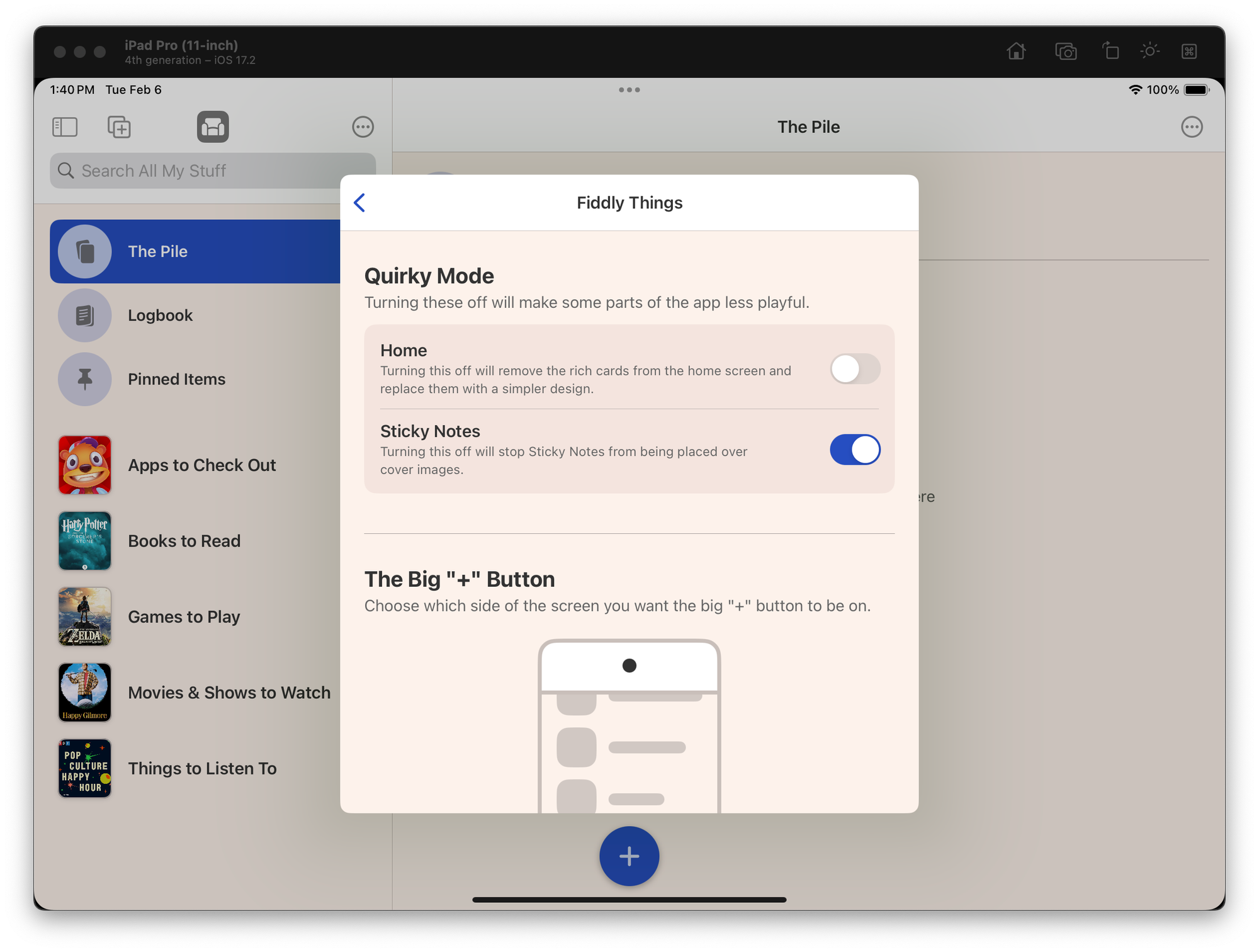
Now, while I love this, I know not everyone will like this more playful design. To accommodate those people, I've added a simpler design as an alternative. That way people can still get all the functionality, but in a more restrained design to match their preference.
Instrong>
A common idea in the world of software design is that if you need to add a setting, then you've failed to create the "right" experience for the user. I couldn't disagree more.
People are complex, and they bring that complexity to the software they use. It's literally impossible to create the "right" experience. If I'm able to accommodate people and absorb some of their complexity into the software, then I will happily do so. It seems like the polite thing to do.
This idea of accommodating users (within reason) is something new I'm playing with, and I'd love to hear if any of this resonates with you (positive or constructive).
This week has mostly been a pain in the ass due to working on performance issues in Sofa. Luckily, I made good progress there and was able to keep iterating on the design changes too.
Ina href="https://www.poohbers.com/blog/2024/01/exploring-some-big-design-changes-for-sofa/">
Well ok then, 4.0 it is!
This does change how I plan to market these updates, but I'll talk about that when the time comes.
I built a backup system into Sofa few years ago. Basically, each day that you open the app, it will make a local backup of your data and save it to a folder in iCloud Drive.
The problem was, automatic backups were freezing the UI on launch. This was caused by me doing this work on the main thread...like an idiot. This is now happening on a background thread so you won't even notice backups being made.
Turns out, a lot of the new work I was doing was leaking memory.em>
Ia href="https://www.poohbers.com/blog/2024/01/exploring-some-big-design-changes-for-sofa/">
I have a few new designs for showing The Pile, Logbook (formerly "Activity"), and Pinned Items (formerly "The Shelf").
The goal with these changes is to make these areas scannable before you even tap into them. Similar to if you had physical versions of these things in your home.
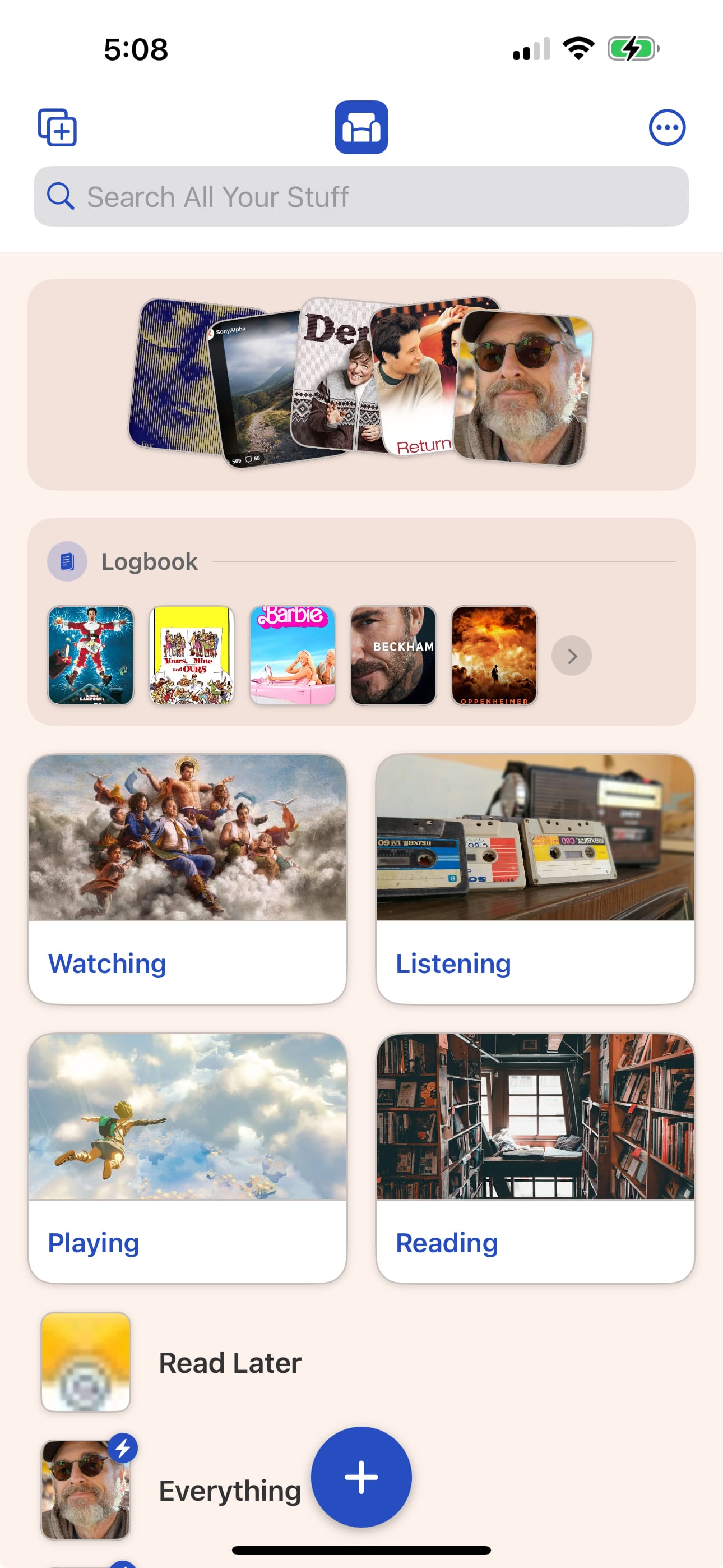
Logbook and Pinned Items are dynamic too. If you don't have anything in them, they won't be displayed on the Home Screen. I was initially going to do the same for The Pile, but as I was using it on my iPad I realized item>
This is due to how the big "+" button works when navigating around the app. Basically, if The Pile didn't show up on the Home Screen you'd never be able to add anything directly to it...which kind of defeats the purpose.
I may consider a setting to allow people to hide The Pile if they really don't want it. Maybe.
Speaking of the big "+" button, I've added a brand new design for choosing what to add to your lists. I had been using a system menu for the past few years, but it was starting to get a bit unwieldy.
1×
On the iPhone it displays as a bottom sheet, and the iPad uses a popover view.
Custom Categories and Ingredients are big new features and so far I've been keeping them in Settings. I don't think they belong there but I wasn't sure exactly where to put them.
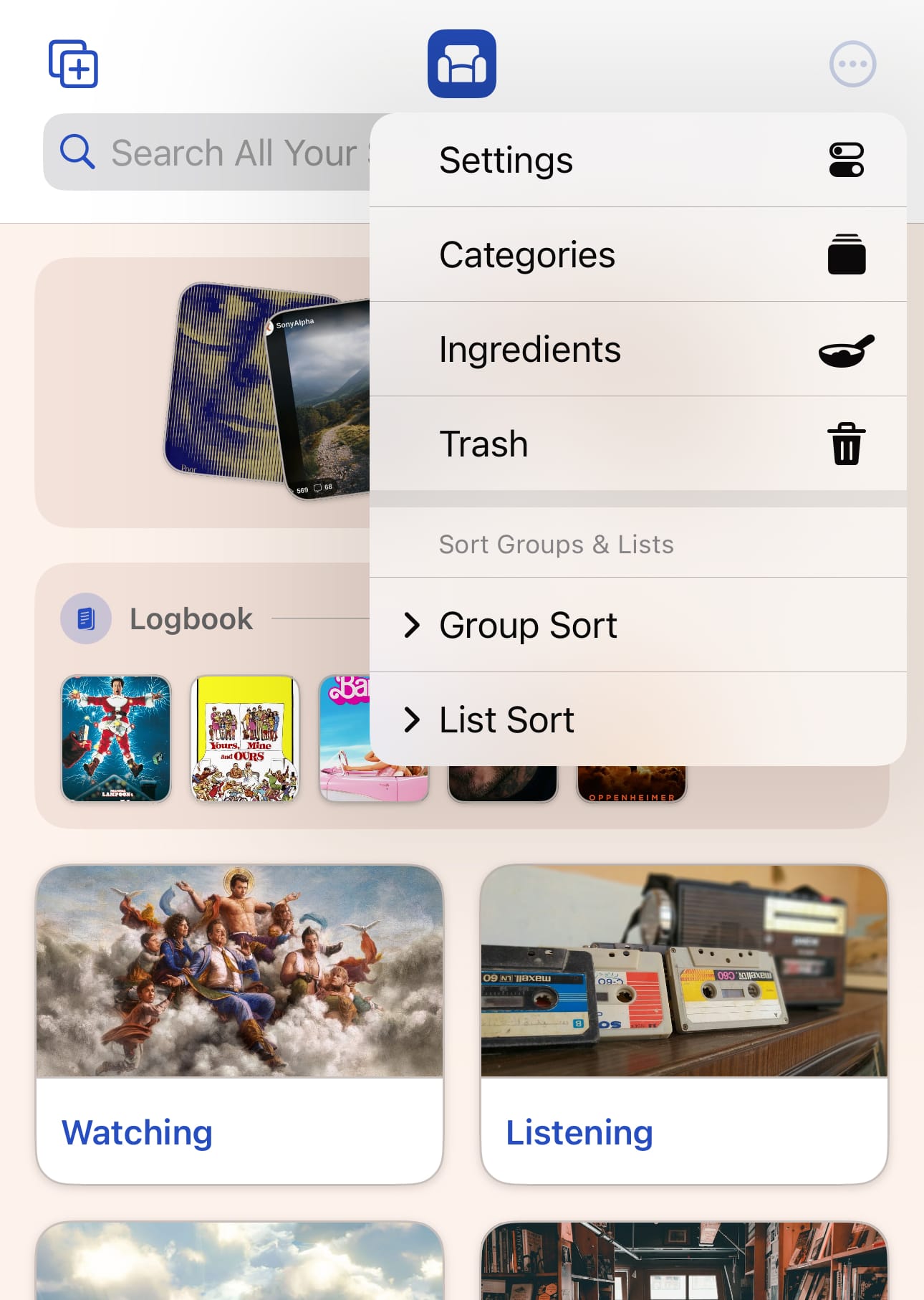
For now, I'm thinking they can live in the ••• button/menu alongside Settings. Still aem>
My next major step is to get this shipped out to beta testers. They are going to be getting a lot of new stuff to play with: Smart Lists and all these new design changes.
Before I can send it out to beta testers I need to do these things:
Hoping to be able to do this next week 🤞.